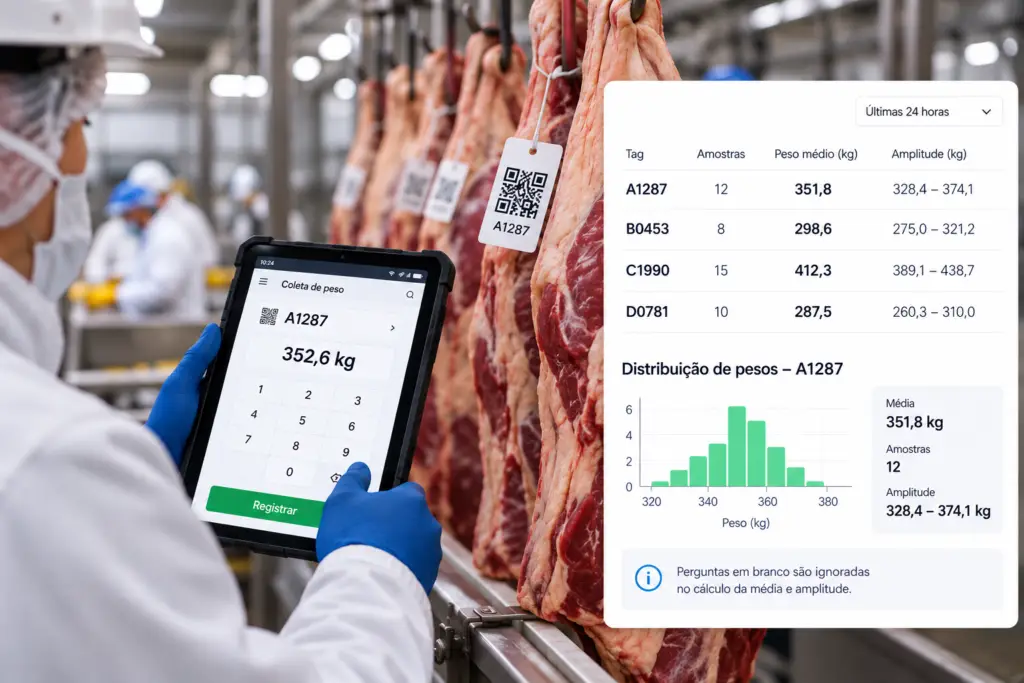
In many food manufacturing plants, package weight control is already done with a digital form. Data collection has moved off paper, but the math hasn’t: at the end of each shift, someone exports the responses, opens a spreadsheet and calculates the average weight and the variation for each batch. That is exactly the step one food manufacturer decided to eliminate, by moving the calculation into the form itself with HashData’s Calculated Field.
The problem: data collection was digital, the math wasn’t
The weight control routine worked like this: at regular intervals, the operator weighed a few packages from the line and recorded each sample in the checklist. The form stored the weights, but it didn’t say whether the batch was within the standard. That answer only appeared later, in the spreadsheet.
This approach had three weaknesses:
- Results came in late. O peso médio só era conhecido depois da exportação. Um lote fora do padrão podia seguir na linha por horas antes de alguém perceber.
- Blank samples skewed the average. When a sample wasn’t recorded, the spreadsheet formula still divided by the total number of planned samples, and the average weight came out lower than it really was.
- Each plant had its own version of the formula. With several plants, the spreadsheets were copied and adjusted locally. The same question, “is the batch on weight?”, was answered with calculations done in different ways.
The change: the calculation moved into the form
The solution was to add two Calculated Fields at the end of the weight checklist: one for the average weight and another for the range, the difference between the heaviest and the lightest sample. The operator keeps recording the weights as before; the difference is that the result appears as soon as the collection is finished.
Tags instead of question names
Todas as perguntas de pesagem receberam a mesma tag, #peso. Com isso, as fórmulas deixaram de depender do nome de cada pergunta. Se uma unidade precisar de mais amostras, basta acrescentar perguntas com a mesma tag: a fórmula continua certa, sem ajuste.
An average weight that ignores blank samples
The average uses the avgByTag function, which calculates the average of filled-in answers only. A missing sample no longer drags the average down.
function calculateValue() {
    return avgByTag('#peso');
}
Range: the stability of the process
The average alone can hide a problem: two very light packages and two very heavy ones can add up to a perfect average. The range shows that spread. If there isn’t enough data to calculate it, the field stays empty instead of showing a misleading zero.
function calculateValue() {
    const maior = maxByTag('#peso');
    const menor = minByTag('#peso');
    if (maior === undefined || menor === undefined) {
        return null;
    }
    return maior - menor;
}
The formulas live in the published form. Every plant that uses the checklist now calculates in exactly the same way, and a rule change is made only once.
What changed in the routine
| Before | After |
|---|---|
| Average weight known only after the export | Average weight and range at the end of each collection |
| A blank sample skewed the average | Average calculated only from filled-in samples |
| One version of the formula per plant | A single formula in the form |
| A spreadsheet built every shift | No manual calculation step |
The biggest gain wasn’t just the time saved on the spreadsheet. It was when the deviation shows up: the operator and the supervisor see the result while the shift is still running, when the line can still be adjusted. And since the average weight and the range become part of the response, they arrive ready for the Advanced Analytics dashboards, by line, shift and plant.
How to replicate it in your operation
- Tag all the weighing questions with the same tag, such as
#peso - Add a Calculated Field after the last sample, with the formula
avgByTag('#peso'). - Add a second field for the range, using
maxByTagandminByTag. - Test it with the response simulation, including samples left blank.
- Publish the form: every plant starts using the same rule.
The same approach works for temperatures, thickness measurements, content levels and any control done by sampling.
Frequently asked questions
Do I need to know how to code? Not for this case. The average by tag is a single line, and the editor suggests the names of the functions and the questions.
What if the number of samples changes? If the new questions are given the same tag, nothing needs to change in the formulas.
Can the result be used in other calculations? Yes. The value of a Calculated Field is available to the fields placed after it, such as a comparison with the package’s nominal weight.
Discover HashData‘s Calculated Fields and see how to bring your operation’s calculations into the form. To see it working in your own checklists, schedule a demo.