5W2H Action Plan: from deviation found to verified action
HashData Action Plan turns every non-conformity into a corrective action with an identified cause, owner, deadline and effectiveness check. The action starts on the checklist question where the problem was found, and statuses update on their own until someone confirms the problem has been solved.
Good practices checklist · Cold room 3
Cold room temperature within standard?
Action plan for this question
Action generated from the response
- What
- Replace the control valve
- How
- Isolate the cold room, replace the valve and test for 24 h
- When
- By Oct 24
- Where
- Cold room 3, cooling line
- Who
- Maintenance supervisor
- How much
- R$ 1,800
Illustrative example of an action created right in the checklist.
In short
Action Plan is HashData’s module for handling non-conformities, audit findings, off-target indicators and safety incidents. Each plan groups anomalies with an identified root cause (supported by the 5 Whys), and each anomaly groups actions using the 5W2H method. Actions can start on the form question itself, in the web portal or in the app, go through automatically calculated statuses and are only completed after the effectiveness check.
5W2H with root cause: three organized levels
The module separates context, problem and solution. A plan can group several anomalies, and each anomaly can have several actions, which reflects reality: the same deviation often calls for an immediate action and a corrective action.
Plan
The context
- Organizational unit
- Source: audit, complaint, indicator
- Indicator and project
- Plan author
Anomaly
The problem and the why
- What is out of standard
- 5 Whys analysis
- Root cause, required
- Attached evidence
5W2H action
The solution
- What, how, when and where
- Who carries it out
- How much it costs
- Type, impact and effectiveness check
The “Why” of 5W2H lives in the anomaly. Requiring the cause before the action avoids fixing the symptom and seeing the same problem come back at the next audit.
Starts in the checklist, the portal or the app
Any data entry question can have the action plan enabled. During data collection, a section appears right below the answer, and the collector creates the action right there, through a simplified wizard. It is also possible to see the actions already linked to that question, so nothing already in progress gets duplicated.
The system keeps the exact source: the form, the question and the selected option. On the plans screen, actions can be filtered by the question that generated them, and an auditor can go from the non-conformity to the action and from the action back to the response.
Plans can also be created directly in the portal, for deviations that come up in meetings, indicators or customer complaints, and imported from Excel spreadsheets when migrating old controls.
Automatic statuses through the effectiveness check
A daily routine updates the statuses. Nobody needs to mark an action as overdue or check deadlines in a spreadsheet. The action is only completed when someone with permission confirms it solved the problem.
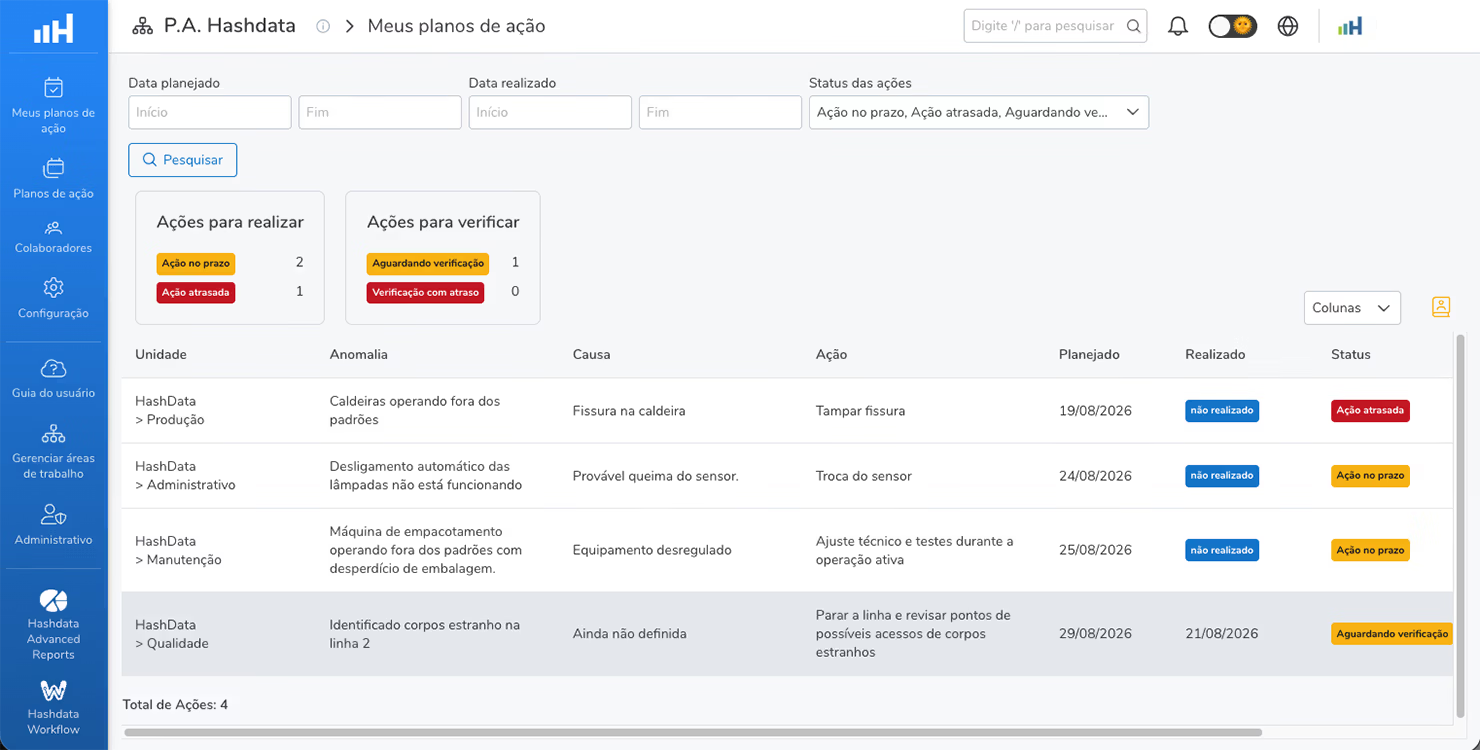
Rescheduling requires a new date and a justification, and only the executor or the plan author can do it. Completed or canceled actions can no longer be edited. Every change is kept in the history with date, time and user.
Role management: everyone in their role
Access is organized by profiles, which work like job roles. Each profile groups permissions, and each permission applies within a scope. This way, a network with dozens of sites gives each plant autonomy without losing the corporate view.
| Permission | What it allows |
|---|---|
| View | See plans, search and export to PDF |
| Manage | Create and edit plans, anomalies and actions |
| Verify effectiveness | Confirm whether the action solved the problem |
| Cancel | Cancel individual actions |
| Delete | Permanently delete plans and actions |
| View history | See the changes made to each plan |
| Manage team members | Define who can access the module |
| Manage settings | Register indicators, sources, types, units of measure, dimensions and profiles |
Three access scopes
- Global: all plans, for quality and continuous improvement coordination.
- Organizational unit: the plans of their own unit, for area supervisors and analysts.
- Own user: only the plans the person authored.
My Actions and deadline alerts
- Each person sees only what they need to carry out or verify.
- The executor gets an email before the execution and verification deadlines.
- Separating who executes from who verifies gives credibility to the closure.
Your company’s language inside the module
| Setting | Answers the question | Examples |
|---|---|---|
| Indicators | Which metric is being addressed? | Process efficiency, yield (kg/ton), rejection rate |
| Sources | What triggered the plan? | Internal audit, external audit, customer complaint, safety incident |
| Action types | What is the nature of the action? | Immediate, corrective, preventive, continuous improvement |
| Units of measure | How is the value displayed? | %, kg/ton, R$/ton, ppm |
| Dimensions | Which perspective does the indicator belong to? | Quality, safety, productivity, financial, environment |
With these classifications, management can answer questions such as: how many actions came from external audits, what share of actions is corrective versus preventive, and which dimensions concentrate the most deviations.
Use cases by industry
| Industry | Situation | How the module is used |
|---|---|---|
| Food industry | Non-conformity in a self-control program | Action created on the checklist question, with a deadline for the regulator and evidence |
| Quality and certifications | Internal or external audit findings | One anomaly per finding and effectiveness check before the next audit |
| Manufacturing | Indicator below target | Plan by indicator and project, with impact fields to measure the gain |
| 5S program | Non-compliant items in the area audit | Action plan enabled on each checklist item |
| Workplace safety | Near miss or unsafe condition | Immediate action followed by corrective action |
| Agribusiness | Good practice deviation during a grower visit | Recommendation with owner and deadline, verified at the next visit |
| Logistics | Incident on a route or in the warehouse | Plans by site, filtered by source and type |
| Consulting firms | Diagnostic findings at clients | Plan per client, with execution tracking |
Action spreadsheet or HashData Action Plan
| Manager’s question | Spreadsheet and messages | HashData Action Plan |
|---|---|---|
| Which response generated this action? | A hand-typed reference, when there is one | Automatic link to form, question and selected option |
| How many actions are overdue right now? | Manual filter on typed dates | Status updated daily by the system |
| Did the action solve the problem? | Row marked as “done” | Effectiveness check by an authorized person |
| Who changed the deadline and why? | No record | Rescheduling with justification in the history |
| Does each site see only its own? | Copies of the spreadsheet per area | Profiles scoped by organizational unit |
Frequently asked questions
What is HashData Action Plan?
It is HashData’s module for recording, tracking and resolving anomalies. Each deviation becomes a corrective action structured with the 5W2H method, with an identified cause, owner, deadline and effectiveness check.
Where is the “Why” of 5W2H?
In the anomaly. The cause is required and can be investigated with the 5 Whys analysis before the actions are defined.
Can the action plan be created during the checklist?
Yes. Form questions can have the action plan enabled. During data collection, in the web portal or in the app, the collector creates the action right below the answer, and the system keeps the question and option that originated the action.
Do action statuses need to be updated manually?
No. A daily routine marks actions and verifications past their deadline as overdue. The action is only completed after someone with permission confirms its effectiveness.
How does access control work?
Through profiles that group permissions, such as view, manage, verify effectiveness, cancel and delete. Each permission applies within a scope: all plans, those of the organizational unit or only the plans authored by the user.
Does Action Plan help with audits such as ISO and food safety inspections?
It organizes the evidence these audits ask for: deviation, cause, action, owner, deadline, execution, effectiveness check and change history. HashData does not certify or guarantee compliance; it structures the record of how non-conformities were handled.
See Action Plan working in your operation
We’ll show you how today’s non-conformities become actions with an owner, deadline and verification, starting from the checklists your team already uses.