Advanced Analytics: every data collection becomes a decision the same day
HashData Advanced Analytics turns data from checklists, audits and inspections into dashboards that update with every response. Teams build their own dashboards, filter by site, period or owner and share them with whoever needs them, without exporting spreadsheets or depending on IT.
Quality · Non-conformities
Non-conformities by category
Sample data. Try the filters: every indicator and chart on the dashboard recalculates together.
In short
Advanced Analytics (HashData Advanced Reports) is HashData’s Business Intelligence module. Data from forms, checklists, audits and surveys becomes interactive dashboards that update with every data collection, with dynamic filters, maps, targets and role-based sharing. The module is rounded out by native results for each form, PDF, Excel and Word exports, custom Excel reports and automatic email notifications.
Custom dashboards without depending on IT
Dashboards are built by selecting fields and dragging and dropping: you pick the data, the chart type and how to group it, by site, by owner, by category or over time. Technical users can go further with queries and formulas for rates, variations and ratios between indicators.
Because the data comes straight from HashData, there is no export, intermediate spreadsheet or integration to set up. A new question on a form can become a chart the same day.
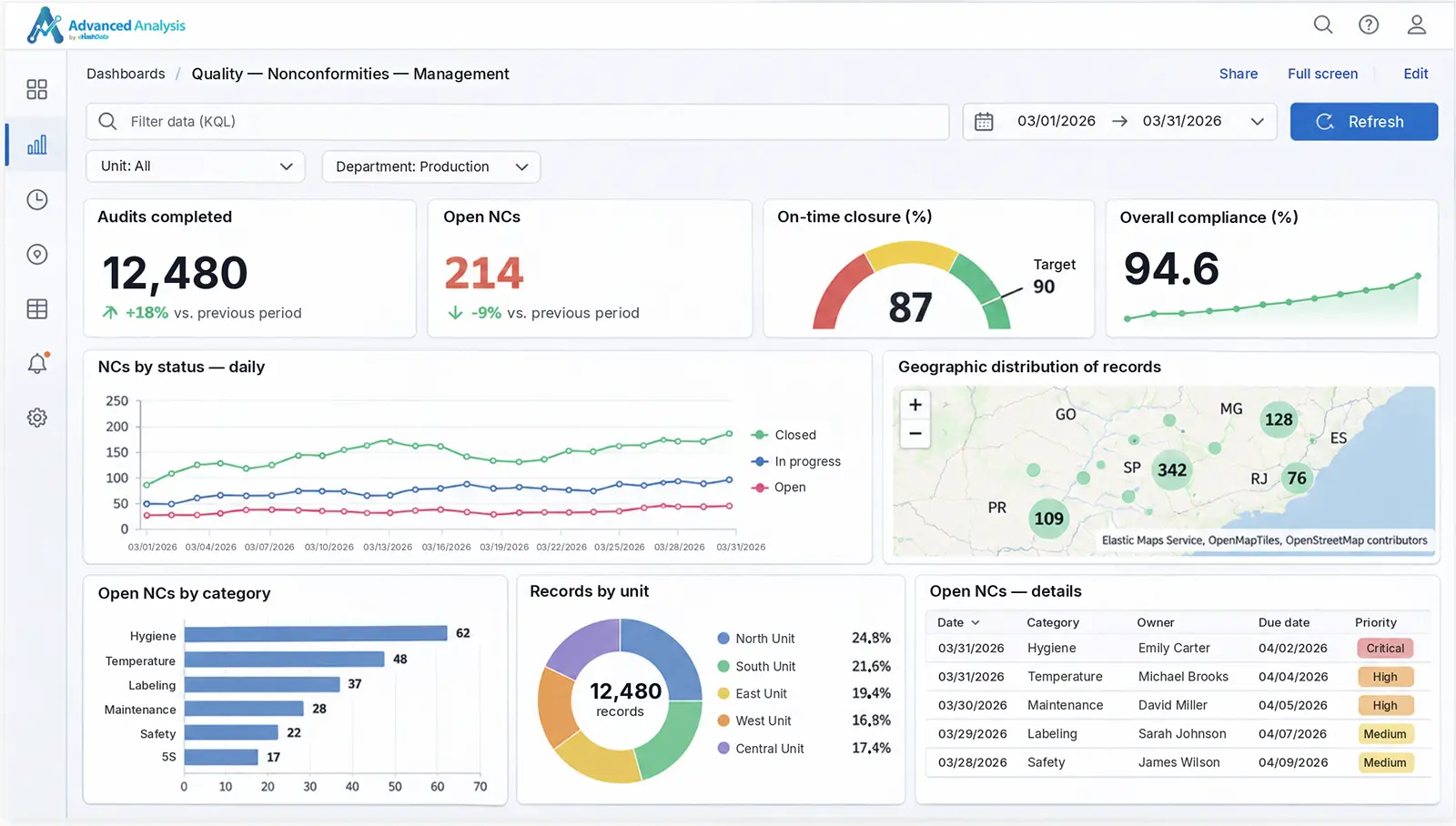
The right chart for every question
| Manager’s question | Visualization | Example |
|---|---|---|
| How much? | KPI or target gauge | Percentage of compliant items, with the target marked |
| How has it changed? | Line or area | Non-conformities per week over the last quarter |
| Who or what is the largest? | Bars | Non-conformities by line, shift or owner |
| How is the total split? | Pie, treemap or mosaic | Occurrences by type and site |
| Where? | Map | Field visit coverage, with points or a heat map |
| What are the details? | Table | List of open non-conformities, with date, type and deadline |
Filters that recalculate everything
- Period filter with preset ranges, such as today, 7 or 30 days.
- Filters by site, owner or any form field.
- Select an area on the map to filter the other charts.
- Drill down from an overview dashboard to a detail dashboard.
A dashboard for every audience
- Executives: key indicators and trends across all sites.
- Management: comparison across sites and categories.
- Supervisors: details of their own area and a list of open items.
- Role-based sharing, including with external clients.
Real-time results, without waiting for period close
Every data collection submitted becomes part of the dashboards. Management sees the problem on the day it was recorded, not in the end-of-month report. In offline operations, data reaches the dashboards as soon as the device syncs.
Besides dashboards, each form has its own results area, with bar, pie or line charts grouped by response or by date, which can be copied or saved as images.
When the workspace uses Collection Routines, routine compliance also goes into the dashboards: inspections done and not done, by routine, form, team member and period. Results from calculated fields, such as audit scores and indexes, arrive ready to be analyzed.
Exportable data and reports
Data and dashboards can be exported to PDF, Excel and Word for meetings, audits or sending to clients. For documents with their own layout, custom reports use an Excel template with placeholders that HashData fills in with the selected responses, keeping the original formatting.
| Template type | What it is for | Example |
|---|---|---|
| Single response | One document from one data collection | Inspection report or individual certificate |
| List | Several responses in rows | Attendance list or list of the day’s inspections |
| Filter | Responses split by criteria | Report with one section per department or site |
Placeholders use each question’s field name, such as {{field_name}}, the same one used in notifications, formulas and automations.
Notifications for whoever needs to act
Each form can have email notifications triggered when a response is created, edited or deleted. Conditions on the responses define when to notify: for example, only when an item is marked as non-compliant or when the reported temperature exceeds the limit.
- Combined conditions: all, any, none or a custom expression.
- Recipients chosen from team members or defined by a form response.
- The data collection is attached as a PDF, with photos and the selected questions.
- Each notification can be enabled, disabled, cloned or deleted.
For multi-step processes, such as approvals, reminders and sending data to other systems, Workflow complements notifications.
Use cases by industry
| Industry | Typical indicators |
|---|---|
| Industrial quality | Non-conformities by line, shift and operator; trend; on-time closure rate |
| Food industry | Temperature by cold room and shift; out-of-range records; lot traceability |
| 5S program | Score by S, area and site across rounds |
| Maintenance | Open and closed work orders; mean time to repair by equipment; round coverage |
| Workplace safety | Planned vs. completed inspections; near misses by area; safety talks by shift |
| Agribusiness | Geographic coverage of visits; applications by field plot; good practices by supervisor |
| Sustainability | Energy, water and waste by site and month |
| Election and opinion polling | Sample progress; voting intention by region, gender and age; trend throughout the campaign |
Frequently asked questions
What is HashData Advanced Analytics?
It is HashData’s Business Intelligence module. Data from forms, checklists, audits and surveys becomes interactive dashboards that update with every data collection, with filters, maps, targets and controlled sharing.
Do I need to export the data to another BI tool?
No. Dashboards use the data collected in HashData directly, with no export, intermediate spreadsheet or integration to set up.
Who builds the dashboards?
The teams themselves, by selecting fields and dragging and dropping, without writing code. Technical users can use queries and formulas for more advanced calculations.
Does the data show up in real time?
Yes. Every data collection submitted becomes part of the dashboards, without waiting for period close or a manual export.
What export formats are available?
PDF, Excel and Word, plus custom reports generated from Excel templates with placeholders filled in by the responses.
How do notifications work?
Each form can have notifications triggered when responses are created, edited or deleted, with conditions on the responses. Recipients get an email with the data collection attached as a PDF.
See your data in a HashData dashboard
We’ll show you how the checklists and audits your team already does become real-time indicators by site.